GTA 6 Collectibles Count and Tracking Guide
GTA 6 tracks 18 Collectible Cards, 31 Landmarks, 35 Curiosities, 23 Sculptures, and 8 Exploration entries on the Collections page in the Progress tab.
Open Collections Page
GTA 6 collectibles sit together in a single spot, tucked inside the Progress tab of the pause menu map. That spot carries the name Collections, and it starts talking to you right away, from the very start of Chapter 1, which carries the title "Gone Fishing". You do not have to pick anything up first for the page to show its totals. The numbers appear before a single find, which I think makes planning a run through Leonida far less guesswork than it sounds.
Pause the game, open Map, switch to the Progress tab and pick Collections. That route lists 18 Collectible Cards, 31 Landmarks, 35 Curiosities, 23 Sculptures and 8 Exploration entries. Those five figures give you the shape of the whole hunt in one look, and they stay visible while you play. Try to check them before you chase a rumour about a hidden card or a scanned statue, because the page tells you how large each set runs.
The button names below use the default controls on PS5.
Press Options to pause the game. A list shows on the left with Map, Game, Store, Help, Photo Studio and Settings. Move to Map and press Cross to open it. Options opens the pause, Cross confirms the choice, and the map fills the screen.
At the top of the map screen, you will see MAP, BRIEF and PROGRESS. Use L1 and R1 to move between the tabs, then select PROGRESS. Those shoulder buttons step left and right across the three tabs, and the selection moves with each press. You must land on PROGRESS rather than MAP or BRIEF, because only PROGRESS holds the cards that track what you have found.
Pick the Collections card. The PROGRESS tab holds a row of 12 cards: Stats, Vehicles, Weapons, Animals, Equipment, Collections, Activities, Contacts, Gangs, Robberies, Challenges and Story Recap. Collections sits sixth in that row, so move to it and press Cross. The row runs across the screen in order, and the sixth slot belongs to Collections, which puts it past the middle of the early cards.
You will know you have reached the right place when the page title reads "PROGRESS / COLLECTIONS". It has three tabs of its own, COLLECTIBLE CARDS, WAINK LOCATIONS and EXPLORATION, and L1 and R1 switch between them here too. That title sits at the top and spells out the path you took, which helps when you return later and wonder whether you opened the right screen.
Collectible Counts By Tab
| Tab | What it holds | Total |
|---|---|---|
| Collectible Cards | Grid of card slots | 18 |
| WAiNK Locations | Five category tiles | 89 scans across three counted tiles |
| Exploration | Row of slots | 8 |
Collectible Cards and Exploration work the same way. Each one holds a set of locked slots, and every slot you have not found yet reads "UNDISCOVERED - Discover for more details." With the first slot selected, the counter shows 1 / 18 on the cards tab and 1 / 8 on the Exploration tab. That shared layout makes the two tabs easy to read once you have seen one of them. In my view, the locked text does a lot of quiet work here, because it stops the page from spoiling a location while still telling you that a location exists.
WAiNK Locations Explained
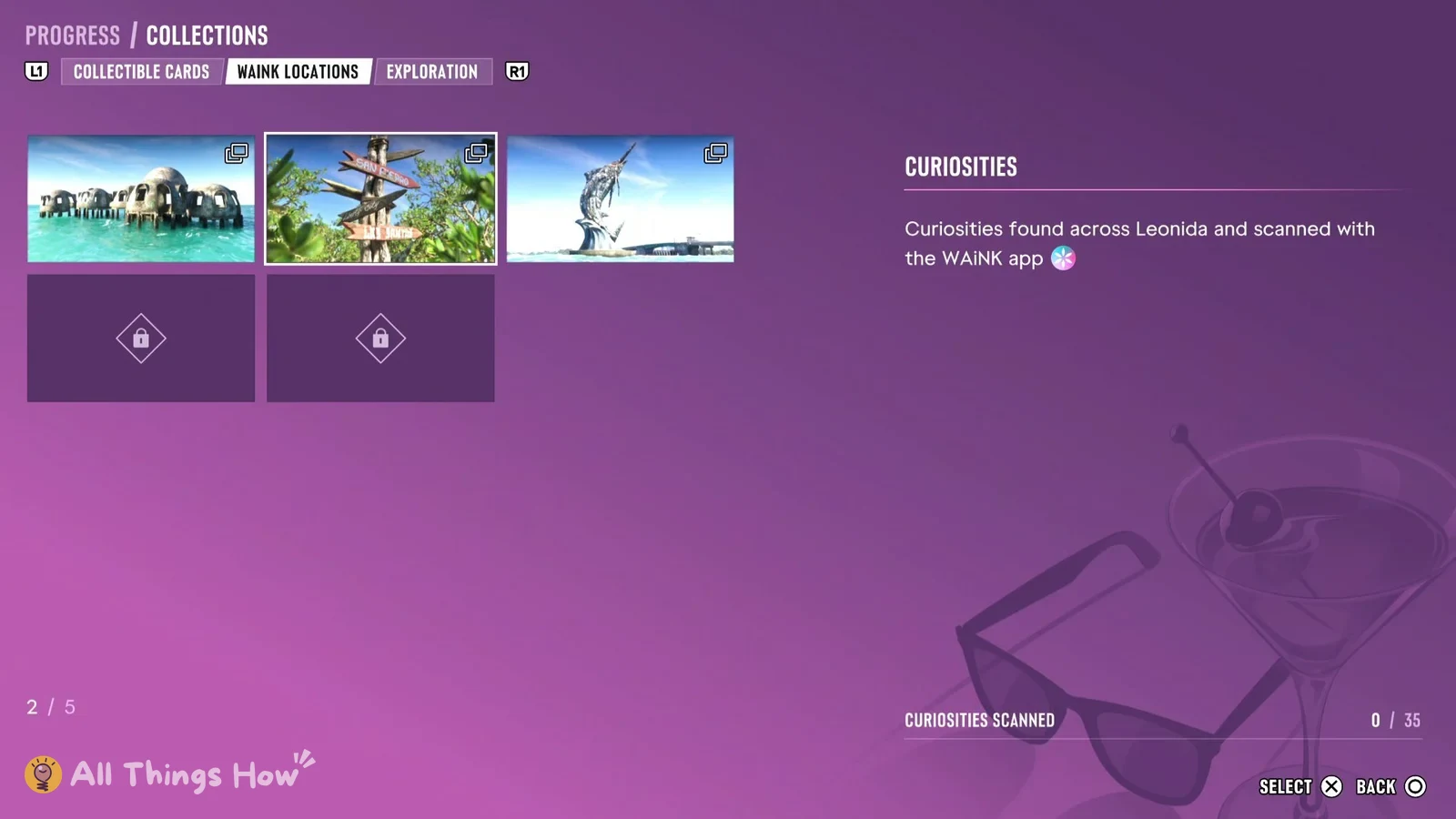
The WAiNK Locations tab splits into five tiles, and the counter there reads 1 / 5. Three of the tiles have a picture and their own scan count. The other two stay locked and show the same "UNDISCOVERED - Discover for more details." text as an unfound collectible, with no total listed. That split caught my attention, because the page gives you a firm number for three tiles and silence for the other two. The locked tiles do not even hint at a size, so you cannot plan around them yet.
| Category | Counter at the start |
|---|---|
| LANDMARKS | LANDMARKS SCANNED 0 / 31 |
| CURIOSITIES | CURIOSITIES SCANNED 0 / 35 |
| SCULPTURES | SCULPTURES SCANNED 0 / 23 |
| Tile 4 | Locked |
| Tile 5 | Locked |
Each counted tile carries a short line saying what goes in it. For Landmarks, the line reads "Landmarks found across Leonida and scanned with the WAiNK app", and Curiosities and Sculptures use the same wording with their own names: "Curiosities found across Leonida and scanned with the WAiNK app" and "Sculptures found across Leonida and scanned with the WAiNK app". That shared wording leaves little room for doubt. You walk up to a place or an object in Leonida, you scan it with the WAiNK app, and the counter moves.
If you open a tile, you get its own scrolling grid of slots. Curiosities, for example, shows a counter of 1 / 35, and every slot reads "UNDISCOVERED" until you scan that spot. Try to open the tile early, because that scrolling view shows you the hunt in full.
The 89 WAiNK scans only cover Landmarks, Curiosities and Sculptures. Two more WAiNK categories stayed locked at the start of Chapter 1, and the page gives no count for them yet. Add the three known totals together, 31 plus 35 plus 23, and you reach 89. The other two tiles sit outside that sum for now, so the full WAiNK total must run higher than 89 once those tiles open. I cannot say how much higher, because the source stays silent on that point.