GTA 6 Current Objective and Missed Dialogue Guide
The GTA 6 BRIEF log replays dialogue, help text, and objective text you missed, reachable from the map screen and filterable by category.
Brief Log Basics
GTA 6 BRIEF log brings back information that passes quickly during play. A character mentions where someone hides, a tip about crouching flashes up in a stealth section, or the objective text fades before you read it. You can bring all of that back from the pause menu without restarting anything. I think this log earns its place there, because a single missed line can leave you circling a camp with no idea where to go.
GTA 6 BRIEF tab sits inside the map screen, and it takes only a few button presses to reach. Open Options, choose Map, and press R1 for the BRIEF tab. Set the filter to Dialogue, Help Text, or Objective Text. Your active objective also shows along the map's bottom edge. This is the short version, and the sections below walk through each step with the exact button names from the PS5 version.
Open Brief Log
These buttons belong to the PS5 version on default controls. Press Options to pause, then move to Map and press Cross. The map screen opens. The line along the bottom center gives your current objective, such as "Search the camp for Donnie", and the mission card at the top left shows the mission name and its goal. In the Chapter 1 mission Gone Fishing, that card reads "GONE FISHING - Help Donnie skim some bricks off a shipment."
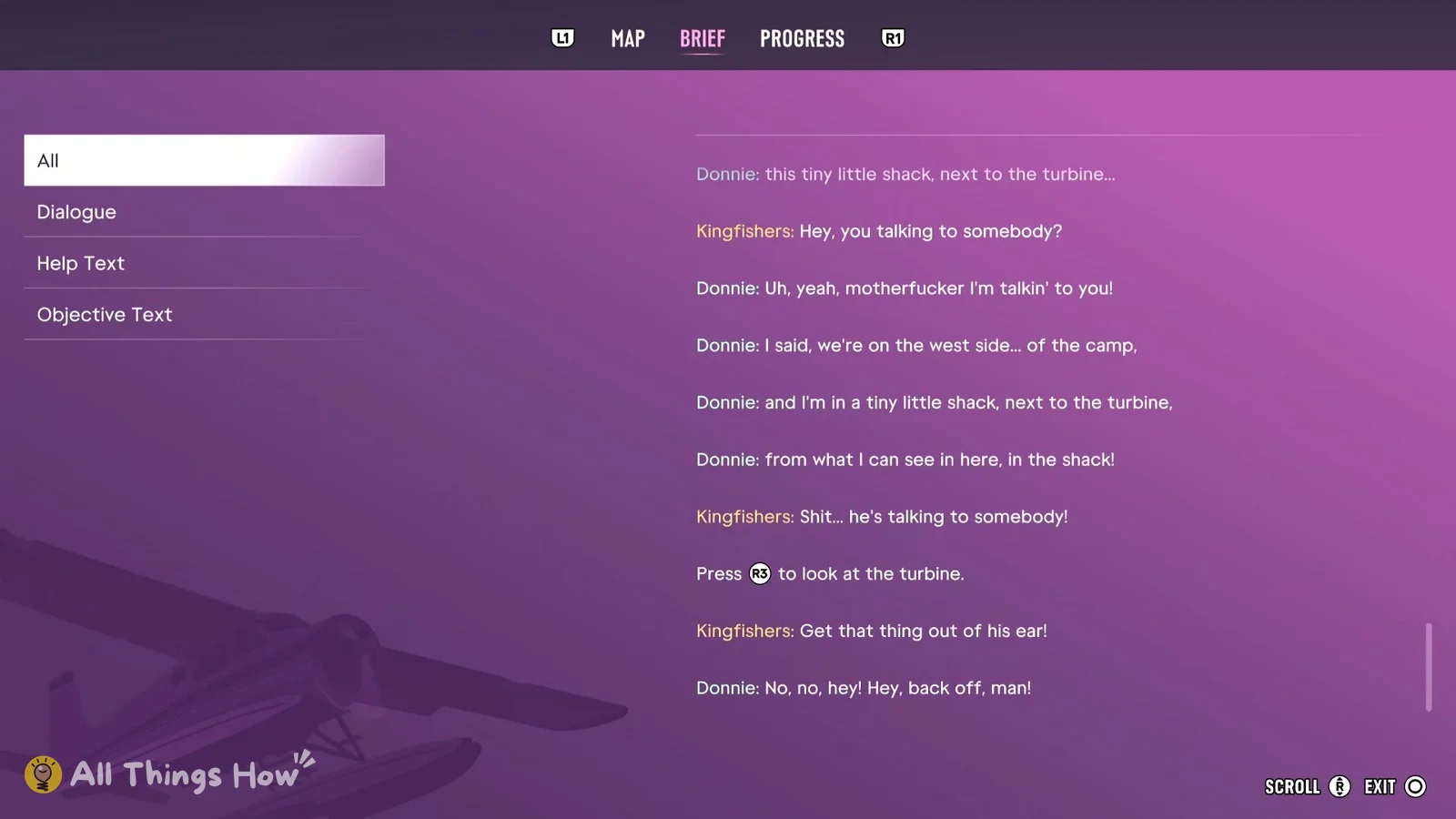
Press R1 once to move from the MAP tab to BRIEF. The three tabs across the top read MAP, BRIEF, and PROGRESS, and L1 and R1 move you left and right between them, so L1 takes you back to the map. That movement feels natural after a couple of uses, and you can flip between the map and the log without closing the pause menu.
Use up or down on the D-pad to choose All, Dialogue, Help Text, or Objective Text from the list on the left. The log starts at its newest lines at the bottom, so move the right stick up to read older entries. Press Circle to close it. Both controls show in the screen's bottom-right corner. The game points you to the right stick for that job, not the D-pad.
Brief Filters Explained
All shows everything in the order it happened. Spoken lines start with the speaker's name in color (Cal, Donnie, Jason, Kingfishers), objectives have their important word in pink, and help tips keep their button icons. That mix makes All the best place to start when you have no idea what you missed.
Dialogue shows spoken lines only, like "Donnie: from what I can see in here, in the shack!" That filter strips out the tips and the objectives, so you read a clean run of conversation from the characters around Jason. I find this filter useful after a long drive, when a line slipped past me and I need only the spoken clue.
Help Text shows control tips only, like "Crouch (Circle) and move quietly to stay hidden." and "Press R1 to take cover." Those lines cover the prompts the game flashes during play, and the filter gathers them in one place after they vanish from the screen. This is the filter to open when a button prompt disappeared before you read it.
Objective Text shows objectives only, like "Search the camp for Donnie" and "Search near the turbine". That filter gives you a short list of goals in the order the game handed them out, with nothing else mixed in. You must not read the whole log to find your next step, because this filter cuts straight to the goals.
Dialogue serves as the filter to check when you have lost track of a clue. In Gone Fishing, Donnie's lines say he sits "on the west side of the camp" in "a tiny shack, next to the turbine", which points you in the right direction when the objective only says to search the camp. That extra detail turns a vague search into a walk to a specific corner of the camp.
Help Text serves as the place to find a tip that disappeared mid-fight or mid-sneak, like the crouch prompt in a stealth section. It also keeps prompts such as "Press R3 to look at the turbine." and "Press L1 to quickly equip or holster your gun." so you do not have to wait for the game to show them again.
Dying and retrying from a checkpoint does not wipe the log. Lines from before you died stay put, and the retried section's lines get added below them, so the same conversation can show up twice in a row. I admit I first read the repeat as a bug, and only after checking the lines around it did I see that the second copy came from the retry.
Check Objective Without Pausing
If you want a reminder of the objective while you play, one of the game's own help tips covers it: pressing the D-pad brings up the HUD along with your current objective. The tip shows the whole D-pad as its icon rather than one direction, and in our game it was still listed in the BRIEF log afterwards. Try to use this D-pad press when you need a quick glance mid-mission, and save the full BRIEF log for the times when you need the spoken clue behind the goal.