How to Show or Hide the GTA 6 Minimap and Street Names (PS5 HUD Settings)
GTA 6 keeps the minimap, compass, street names, and money readout on separate rows in the UI tab, so you choose which HUD elements stay visible.
Minimap and HUD
GTA 6 minimap, compass, street names, money readout, and most pop-ups each get their own row in the UI tab of the pause menu Settings, and GTA 6 UI tab holds 70 rows in total. I think the HUD menu looks worse than it plays, since the groups do the sorting for you.
GTA 6 HUD changes start in the pause menu, and GTA 6 players should pause, open Settings, press L1 or R1 to reach the UI tab, then change the row. Try to change one row and play with it before you change five more. Street Names could stay off for months before you notice it.
Open UI Tab in Settings
GTA 6 UI tab opens from the pause menu, and GTA 6 players should open the pause menu and pick Settings, since every HUD option sits under Settings. GTA 6 players should press L1 or R1 to move across the tabs until they reach UI.
Most Asked HUD Toggles
GTA 6 Street Names sits under HUD Notifications and then Street Names, and GTA 6 Street Names starts Off by default, so you have to turn it on yourself. GTA 6 Compass sits under Navigation and then Compass, and it offers three choices and starts on Off. GTA 6 Minimap sits under Navigation and then Minimap, with three choices, plus a separate Minimap Size row beside it.
GTA 6 minimap behavior at first depends on a choice you make the first time you start the game. GTA 6 setup screen asks for a Navigation Experience, and you can pick "Minimap (Dynamic)", where the minimap shows up on demand, or "Minimap and Compass (Dynamic)", or "Minimap Always On".
HUD Settings Group by Group
GTA 6 HUD defaults below show what a fresh install shows, apart from Minimap, which reads On because "Minimap Always On" was picked at first start.
Navigation Minimap Compass GPS
| Setting | Default | Choices |
|---|---|---|
| Minimap | On | 1st of 3 |
| Minimap Size | Default | 1st of 2 |
| Compass | Off | 3rd of 3 |
| GPS Route | On | On / Off |
| GPS Turn Indicators | On | 1st of 3 |
| In-World Markers | On | 1st of 3 |
| Door Markers | On | 1st of 3 |
| Interaction Markers | On | On / Off |
| Altimeter | On | On / Off |
Reticle
| Setting | Default | Choices |
|---|---|---|
| Persistent Center Dot | Off | On / Off |
| Reticle Hit Markers | On | On / Off |
| Reticle Size | Default | 1st of 2 |
| Reticle Shape | Complex | 1st of 4 |
| Equipped Reticle Visibility | 10 | Slider |
| Aiming Reticle Visibility | 10 | Slider |
| Reticle Messages | On | On / Off |
| Projectile Arc | Off (Toggle On) | 1st of 4 |
GTA 6 Aiming Reticle Visibility carries the description "The visibility of the reticle when aiming."
Combat
| Setting | Default |
|---|---|
| Weapon Preview | On |
| Ammo | On |
| Threat Indicators | On |
| Damage Region Highlights | On |
GTA 6 Threat Indicators carries the description "Displays on-screen indicators for threats nearby or when they are in combat with you."
HUD Notifications Street Names
| Setting | Default |
|---|---|
| Ticker Feed | On |
| Criminal Profile | On |
| Relationship | On |
| Help Text | On |
| Reminder Tips | On |
| Objective | On |
| Mission Update | On |
| Phone Notifications | On |
| Area Discovery | On |
| Area Names | On |
| Street Names | Off |
GTA 6 Street Names sits as the last row in the group and the only one that starts off.
Progress Notifications
| Setting | Default |
|---|---|
| Progress Notifications | On |
| Weapons | Off |
| Vehicles | Off |
| Animals | Off |
| Collections | On |
| Stunts | On |
| Basketball | On |
| Challenges | Off |
| Map Updates | On |
GTA 6 Vehicles row carries the description "Displays a notification when a new vehicle is discovered."
Player Vehicle Status Money
| Setting | Default |
|---|---|
| Player Vitals | On |
| Wanted Stars | On |
| Heat Indicators | On |
| Money | On |
| Vehicle Name & Status | On |
GTA 6 Money row carries the description "Displays how much money you have on the HUD. Can be recalled by pressing" and then shows a D-pad icon.
Prompts
| Setting | Default | Choices |
|---|---|---|
| In-World Prompts | On | On / Off |
| Prompt Visibility | 7 | Slider |
| Vehicle Prompt | Off | 1st of 3 |
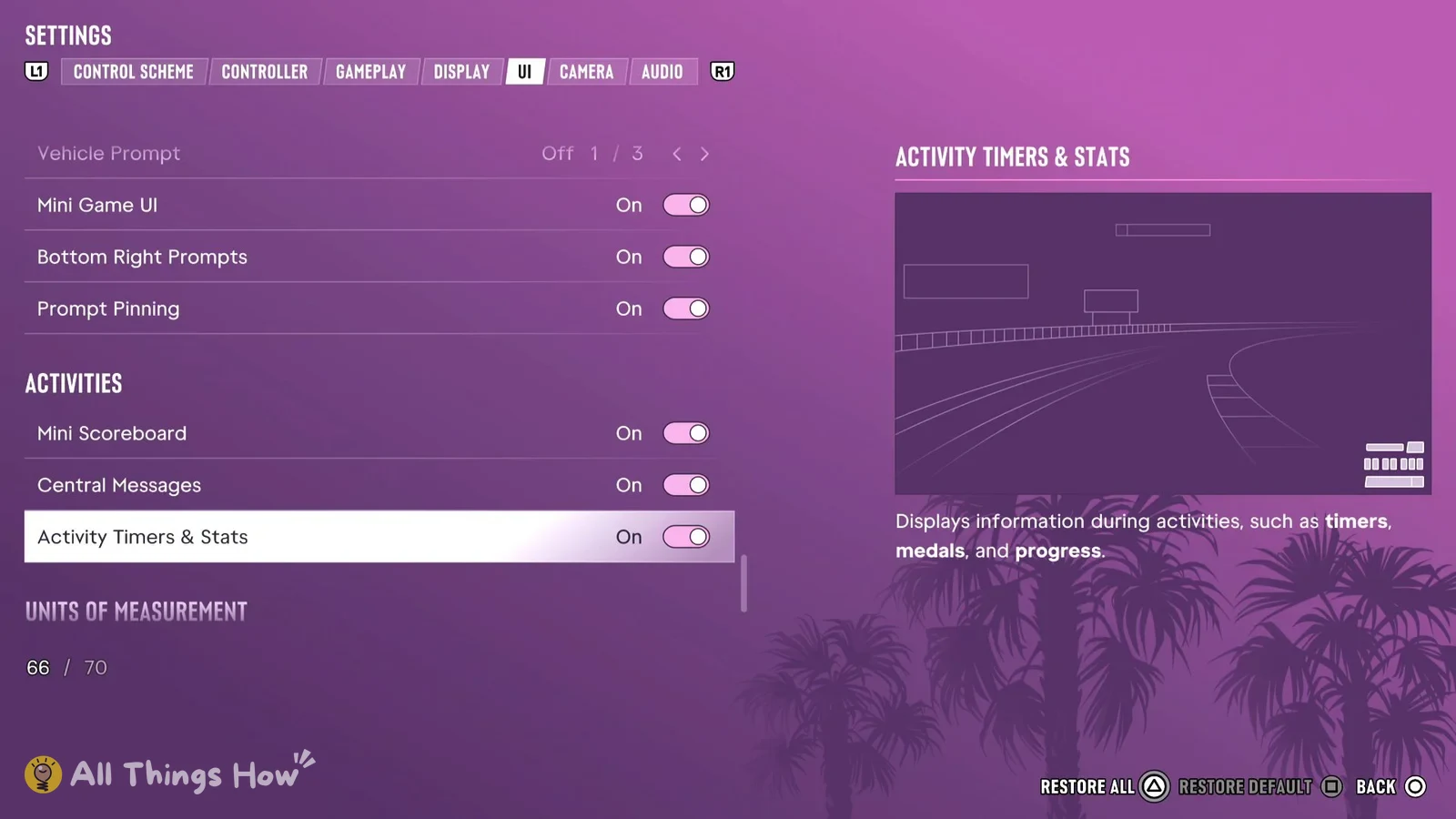
| Mini Game UI | On | On / Off |
| Bottom Right Prompts | On | On / Off |
| Prompt Pinning | On | On / Off |
Activities
| Setting | Default |
|---|---|
| Mini Scoreboard | On |
| Central Messages | On |
| Activity Timers & Stats | On |
GTA 6 Activity Timers and Stats carries the description "Displays information during activities, such as timers, medals, and progress."